Nail Design App: Art & Inspo
NailKnowledgeBeauty
0.00.00 Reviews
- Version
- 1.4.10
- Installs
- 10.00K
- Age Rating
- Everyone
Screenshots

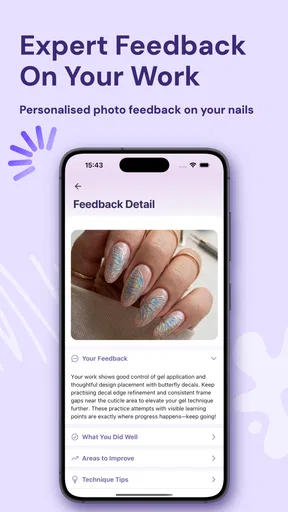

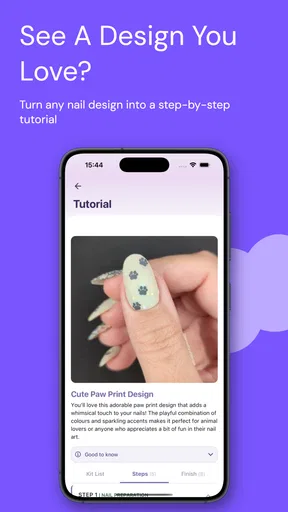
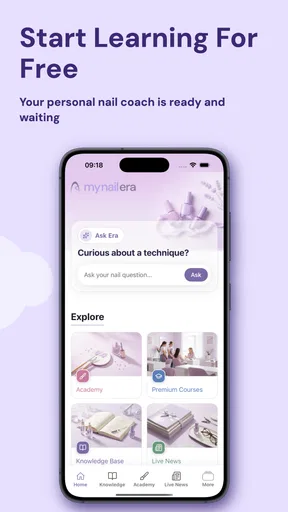
Our Review of Nail Design App: Art & Inspo
 Analysis by Appyee
I approached Nail Design App: Art & Inspo as someone who enjoys doing my own nails but often loses time deciding what to try. My first impression was that it works best as a practical visual coach rather than a simple gallery of pretty manicures. It gives the search for a design a clearer direction, then turns that inspiration into a sequence I can follow at home.
That distinction matters. Plenty of beauty apps are good at showing attractive finished looks, but a finished photograph does not always tell me where to begin, how to separate the steps, or which part of the design is likely to be difficult. This app is more useful when I want to move from “I like that” to “I can attempt that.” My overall view is positive, with one important qualification: it is most valuable for learners and enthusiastic hobbyists, not for someone expecting a complete professional salon-management tool.
What using the app feels like
The focus is firmly on nail design, tutorials, and visual inspiration. I found that combination more helpful than browsing disconnected social posts because it encourages a simple workflow: look for an idea, study the process, and decide whether it fits my current skill level and available tools.
The step-by-step approach also changes how I judge a design. A manicure can look easy in a final image while hiding a demanding detail, such as a fine line, a symmetrical pattern, or careful layering. When I look at a design through a tutorial format, I can think about the order of work instead of only the result. That makes the app useful before I start painting, not just while I am trying to copy something.
I especially appreciate this for short practice sessions. If I have only a little time, I can choose a design with a manageable number of visual elements rather than beginning an ambitious look and abandoning it halfway through. The app does not remove the need for patience or a steady hand, but it helps me make a more realistic choice.
The presentation also suits people who learn visually. Written nail advice can explain technique, but a picture or guided sequence usually makes spacing, placement, and color relationships easier to understand. I would still treat every tutorial as guidance rather than a guarantee of an identical result, because nail shape, polish consistency, brush control, and drying time all affect the outcome.
Why the tutorial format is the strongest part
The most convincing reason to try this app is that it connects inspiration with action. I can use it in three different moments: when I am collecting ideas, when I am choosing a realistic project, and when I need a reference during the manicure itself. Those are separate needs, and many ordinary image searches handle only the first one.
Before starting, I would use the app to compare the overall complexity of several looks. A design with a clean accent detail may be a better weekday project than a full set covered in tiny decoration. This sounds obvious, but making that decision in advance saves polish and frustration. It also helps me avoid the common mistake of choosing a design because it looks impressive without asking whether I can reproduce it with the tools I own.
During the process, I would keep the tutorial nearby and treat each stage as a checkpoint. I find that more reliable than repeatedly switching between unrelated images, especially when I am trying to remember which layer should dry first. The app’s value here is not that it magically improves technique; it gives my practice a structure.
After finishing, I can use the result as feedback. If a detail looks uneven, I can identify whether the problem came from the base, the placement, or the final decoration. That turns a failed attempt into a useful lesson. For beginners, this is an overlooked benefit: a guided project gives you something specific to evaluate instead of leaving you with the vague feeling that the whole manicure went wrong.
Useful ways to build a personal practice routine
I would not open this app only when I need an urgent design for an event. It works better as a small practice library. One useful routine is to choose one simple look, repeat its key element on a few nails, and then adapt it to a different color combination. This lets me focus on control and consistency rather than constantly learning an entirely new pattern.
Another good approach is to separate inspiration from execution. I can browse when I am relaxed, save a mental shortlist, and later choose one design based on the time I actually have. That prevents the familiar situation where I begin with an exciting idea late at night and discover that the preparation alone is too demanding.
A third approach is to use the app as a planning tool for a mixed set. Instead of copying every nail exactly, I can select one feature from a tutorial for an accent nail and keep the other nails simpler. This is often more forgiving and can produce a polished result even when my technique is still developing. The app’s design ideas are therefore useful as building blocks, not only as complete looks to reproduce perfectly.
The best results come from treating each tutorial as a flexible template, not a test that I have to pass. I can adjust the number of decorated nails, simplify a difficult detail, or change the colors while keeping the basic structure. That makes the app more approachable for ordinary home users who do not have a full professional kit.
Where it fits among familiar alternatives
The usual alternative is to search a general image platform or watch scattered short videos. Those options can offer a much larger variety, but they also make me do more sorting. A broad search may show beautiful work without explaining the order of application, and a video feed can encourage quick scrolling instead of deliberate practice.
Nail Design App: Art & Inspo feels more focused. Its advantage is not necessarily endless variety; it is the connection between nail-specific ideas and a coaching mindset. If I want one place centered on designs I can study and attempt, that focus is convenient.
On the other hand, a general video platform may be better when I need an extended demonstration of a technique. Someone learning detailed brushwork, product handling, or correction methods may prefer a longer lesson with spoken explanation. Likewise, a social platform may be stronger for discovering current trends or seeing how a design looks on many different nail lengths and shapes.
For me, the sensible combination is to use this app for choosing and structuring a project, then consult a more specialized learning source if a particular technique needs deeper explanation. That is not a weakness unique to this app; it is the normal trade-off between a focused design coach and a broad video library. The important point is knowing which job I want the app to perform.
The limitations I noticed before recommending it
The app cannot compensate for missing equipment or limited technique. If I do not have suitable colors, a fine brush, a dotting tool, or enough time for layers to dry, a tutorial may still be impractical. I need to adapt the design to what is on hand. Beginners should expect a learning curve even when the instructions appear clear.
There is also a difference between understanding a sequence and executing it cleanly. A step-by-step guide can show me what to do, but it cannot steady my hand or make a thick polish behave like a thin one. I would have liked to see the app as a companion to practice rather than assuming that following the steps will immediately produce salon-level results.
Another consideration is the free-to-use model. The app is free to download, but it includes optional purchases ranging from $2.49 to $49.99 per item. That does not automatically make it poor value, yet I would explore the freely available material first and decide whether the additional content genuinely improves my routine. A casual user who only wants occasional ideas may not need to spend anything, while a committed learner may find paid material worthwhile if it offers designs they will actually practice.
I also think the app is less suitable for someone looking for a full beauty appointment experience, product marketplace, or detailed nail-care reference. Its identity is narrower and clearer: it is about design ideas and guided practice. That focus is a strength when it matches my goal, but it means I would choose another type of app for scheduling, salon discovery, or broader hand-care information.
Who will get the most from it
Beginners are the obvious audience, especially people who feel overwhelmed by the gap between a finished manicure photo and the first practical step. The app gives those users a more approachable starting point. Instead of trying to invent a design, they can follow a visual plan and learn which details are manageable.
It is also a good fit for intermediate hobbyists who already know basic polish application but need fresh ideas. I can use a tutorial to break a creative plateau, test a new arrangement, or turn a familiar color palette into something more distinctive. The coaching angle remains useful even after the basics become comfortable.
Busy users may appreciate it for a different reason. A clear design reference helps me decide quickly whether a look suits a short evening session or should wait for the weekend. For example, if I am preparing for a dinner and have limited time, I would choose a simple base with one memorable accent rather than attempting intricate decoration on every nail. The app helps make that decision visually, which is faster than experimenting blindly.
Parents or friends planning a shared manicure session could also use it as a menu of ideas. Choosing a design together is easier when everyone can point to a visual example and agree on how much effort it involves. I would still keep the project age-appropriate and use ordinary safety judgment around polish and tools, but the app’s Everyone content rating makes it broadly accessible as a beauty application.
Professional nail technicians are a more conditional audience. The app may be useful for inspiration or for suggesting approachable designs to clients, but I would not treat it as a replacement for professional training, advanced technique references, or salon workflow software. A working technician needs consistency, speed, sanitation knowledge, and product-specific expertise beyond what a design-focused coach is intended to provide.
Device and purchase considerations
The app runs on Android devices using version 7.0 or later, so compatibility should be straightforward for many users with relatively recent phones or tablets. I would still prefer a larger screen when following a detailed design, because small visual elements are easier to inspect on a tablet than on a compact phone. A phone remains convenient at a manicure table, but screen size can affect comfort during close work.
The current version is 1.4.10, and the developer is NailKnowledge. The app has passed the ten-thousand-install mark, which suggests that it has found an audience without making that figure a reason by itself to download it. What matters more to me is whether the available tutorials match my taste and ability level.
Because optional purchases are present, I would approach the app in stages. First, I would use the free experience to test the teaching style and see whether the designs feel practical with my supplies. Then I would consider spending only if I return regularly and want more structured inspiration. This is a better value test than buying immediately because the usefulness depends heavily on personal skill, preferred styles, and how often I do my nails.
The age rating of Everyone is appropriate for a general beauty and design app, but it should not be confused with professional instruction. Younger users may enjoy choosing designs, while actual polish application still benefits from adult supervision and sensible handling of beauty products.
My practical recommendation for first-time users
When opening the app for the first time, I would resist choosing the most elaborate design. I would start with a look that has one obvious focal point and a base that I already know how to apply. That gives me a chance to judge the clarity of the tutorial without allowing difficult preparation to dominate the experience.
I would also prepare the work area before following the steps. Lay out the colors, tools, cotton swabs, and a cleanup brush first, then check whether the design requires more drying time than I have available. This small habit makes the guided format much more effective. It also reveals whether a design is genuinely convenient for home use or merely attractive in a finished image.
For a stronger result, I would photograph each attempt from the same angle and compare it with the reference only after the polish has fully settled. That helps me notice proportion and spacing problems without trying to correct everything while the surface is still wet. Over several projects, this creates a personal record of which techniques I can repeat confidently and which ones need simpler variations.
I would not judge the app after one difficult manicure. The better test is whether it helps me make smarter choices on the next attempt. If I learn to simplify a pattern, plan drying time, and select a design that suits my tools, then the app is doing something more valuable than merely showing attractive pictures.
My final view
After using it as a design planner and tutorial companion, I see Nail Design App: Art & Inspo as a focused, approachable choice for home nail enthusiasts. Its strongest quality is the bridge it builds between inspiration and execution. I can browse for an idea, think through the effort involved, and use a guided sequence to make the project feel less intimidating.
The limitations are equally clear. It will not replace hands-on practice, professional education, or a broader beauty toolkit. Some designs may still be too demanding for a beginner, and users should evaluate optional purchases carefully rather than assuming every extra item is necessary. People who mainly want salon bookings, product shopping, or long-form technical lessons should look elsewhere or pair it with another resource.
For someone who regularly says, “I want to try something different, but I do not know where to start,” I would recommend giving it a chance. It is free, broadly accessible, and centered on a genuinely useful problem: turning a nail design idea into a doable plan. My recommendation is strongest for beginners and intermediate hobbyists who enjoy learning by looking, copying, and gradually adapting. If that sounds like you, the app has enough practical value to earn a place in your beauty routine.
Verdict
Strengths of Nail Design App: Art & Inspo
- Large gallery of creative nail designs for different styles and occasions.
- Useful inspiration for beginners, salon visits, or at-home manicures.
- Easy to browse ideas by color, pattern, length, and overall style.
- Helps users discover seasonal trends and popular manicure looks.
- Design images can make it easier to explain your preferred style to a nail technician.
Limitations of Nail Design App: Art & Inspo
- Some designs may require advanced skills or professional salon equipment.
- The app may include repeated or very similar inspiration images.
- Certain features or design collections could be limited behind in-app purchases.
- Image quality and practical results may vary depending on the original creator.
- Ads may interrupt browsing or make exploring the gallery less convenient.
Similar Picks in This Category
View All
Beauty Makeup Editor & Camera
Photo & Video Editors - Instant Solution4.7

Perfect365: Face Makeup Editor
Perfect365, Inc.3.5

Mirror Plus - HD Mirror app
Digitalchemy, LLC4.8

Cute Lock Screen & Wallpapers
Prometheus Interactive LLC4.6

HD Camera for Android
One Music Player4.5

Phone Mirror app - True Mirror
Cards4.6
Frequently Asked Questions
What is Nail Design App: Art & Inspo?
Nail Design App: Art & Inspo is a visual inspiration tool for anyone interested in manicure ideas, nail art, and beauty trends. It brings together different design concepts that can help you choose colors, patterns, shapes, and decorative styles before your next manicure. It is especially useful when you want fresh ideas but do not know what design to request or recreate.
Can I use Nail Design App: Art & Inspo to create my own nail designs?
The app is primarily designed for discovering and browsing nail art inspiration rather than replacing professional design software. You can explore different styles and use the examples as references for your own manicure ideas. Depending on the available features and version, you may also be able to save or organize favorite designs, making it easier to return to looks you would like to try later.
Does Nail Design App: Art & Inspo work for beginners?
Yes. The app can be helpful for beginners because it presents nail designs visually, allowing you to compare simple and more detailed styles without needing previous nail-art experience. New users can start with basic colors, French tips, minimalist patterns, or short-nail ideas, then gradually explore more elaborate designs as their confidence and technique improve.
Can the designs be used as references at a nail salon?
Yes, the designs are useful as visual references when speaking with a nail technician. Showing a picture can make it easier to explain the preferred colors, length, shape, finish, and decorative details. However, the final result may vary because of your natural nails, available products, the technician’s technique, and the differences between a screen image and real-life polish.
Is Nail Design App: Art & Inspo free to download and use?
The app may be available to download without an upfront charge, but some features, content, advertisements, or premium options can depend on the current version and the platform you use. Before downloading, check the official Google Play or App Store listing for pricing, subscriptions, in-app purchases, supported devices, and privacy information so you understand any possible costs.
